

Backup Solutions
The back-up solutions deployed by IT organisations today must address a growing list of challenges to data protection, backup, recovery, and archiving.
Author: Clarissa Vosloo
Reading time: 3minutes
Online backup facilities are used by millions of users globally. Whether you’re a business or personal user, it’s essential to have some form of backup software in place for all your documents and data, else risk losing everything to a hard drive crash.
Types of Backups:
Although there is a multitude of different backups, we will only take a deeper look into three of the most occurring backups named:
- Full Backups: It is a method where all the files and folders selected for the backup will be backed up, commonly used as an initial or first backup followed with differential backups.
These backups are fast and easy to manage as the entire list of files and folders are in one backup set, and it’s easy to maintain and restore different versions.
The full backups can also take very long as each file is backed up again every time the full backup is run. It can consume the most storage space compared to differential backups.
2. Differential Backups: This is a backup of all changes made since the last full backup.
Differential backups are much faster, more efficient use of storage space, and restores faster, although it might be more complicated to restore then full backups.
3. Incremental Backups: A backup of all changes made since the last backup. The last backup can be a full backup or simply the last incremental backup.
Incremental backups are much faster backups and use storage space efficiently as files are not duplicated.
Restores are slower than with a full backup and differential backups and are known to be a little more complicated. (Webmaster, 2012).

Backup solutions must solve complex challenges such as:
A backup solution is a tool for preserving all an organisation’s data indefinitely (Graybookmarks, 2021).
- The growth of data
- More complex environments
- Broader spectrum of applications, devices, and users
- Stringent performance and compliance goals
- Multiple point solutions
- Stricter cost control
The best back-up software makes it simple and easy to reliably back-up your saved files and folders, as well as provide advanced options to better manage your saved data.
Backup Strategies
As with different backup types you also get different backup strategies; on-site, off-site and cloud strategies.
To compile a backup strategy for your business you can easily follow these 4 steps.
- Determine what data must be backed up.
- Determine how often the data must be backed up.
- Identify and implement a suitable backup and recovery solution.
- Test and monitor your backup system frequently (Spanning, 2021).
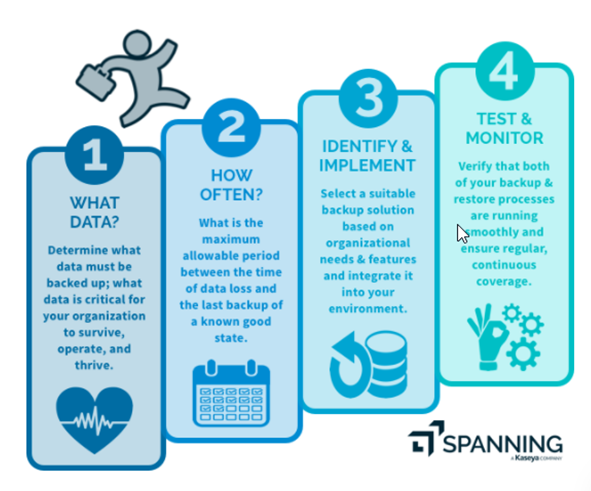
Image: Spanning
What do we do at iTRINITY Consulting?
- We cover all spectrums of local and cloud backups with multiple partnerships with backup software providers.
- We sit face-to-face with clients to best understand their workflow, processes, and data management to advise the best possible strategy and setup, to ensure both maximum security and redundancy of the client’s data.
- We run backups as often as possible to avoid any loss of information.
- We encrypt backups to protect data from malicious software’s, viruses, and ransomware.
- We test backups monthly to validate and ensure backup integrity.
- We provide all documented info to clients in hardback for safe keeping for peace of mind.
Although different types of backups can be used for different reasons, all backup sets (first full backup and all incremental backups) are needed to perform a restore (Webmaster, 2012). Don’t stress, at iTRINITY Consulting, we have your ‘BACK!’
Contact our team today for a friend in need!