
Malware is invasive software or computer code designed to infect, damage, or gain access to computer systems.
Some strains of malware target financial data and other sensitive information, and they’re used to commit extortion, fraud, and identity theft. And malware isn’t a threat only to Windows PCs — Macs and mobile devices are also vulnerable to malware attacks.
Malware definition
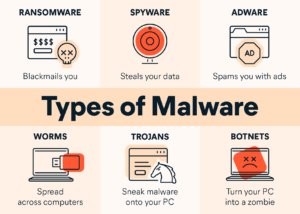
Malware is defined as any type of “malicious software” designed to infiltrate your device without your knowledge, cause damage or disruption to your system, or steal data. Adware, spyware, viruses, botnets, trojans, worms, rootkits, and ransomware all fall under the definition of malware.
Is malware a virus?
Yes and no. While all computer viruses are malware, not all types of malware are viruses. Think about it this way: Malware is malicious code. And viruses are just one type of malware.
How does malware work?
All types of malware follow the same basic pattern: Your device gets infected after you unwittingly download or install malicious software, often by clicking on an infected link or visiting an infected website. Mobile devices can also be infected via text messages.
Another technique is to load malware onto the firmware of a USB stick or flash drive. Then, when the USB stick is connected to another device, the malware will likely remain undetected, because it’s loaded onto the device’s internal hardware (rather than its file storage). Never insert an unfamiliar USB drive into your computer.
Once the malware has been installed, it infects your device and begins working toward the hackers’ goals.
Common types of malware
How will I know if my device has been infected?
Your device begins running slower than usual
- Malware takes over your device’s processing resources.
You notice a shortage of available storage space
- Sudden decrease in the amount of free storage.
Pop-ups and unwanted programs appear on your device
- Getting slammed with pop-up ads or finding strange new programs on your device.
If your device is showing any of these symptoms, get in touch so we can recommend strong antivirus software and scan your device to get rid of any malicious software.
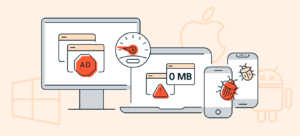
Common malware symptoms include seeing lots of pop-ups and experiencing performance slowdowns.
How to protect against malware attacks?
The best way to protect against the different types of malware is to use comprehensive anti-malware software that detects, blocks, and removes viruses.
Reduce your exposure to malware by always following these steps:
- Don’t click shady pop-ups or banner ads.
- Avoid links, email attachments, and downloads you’re unsure of.
- Keep your software updated to benefit from the latest security patches.
- Only install mobile apps downloaded from the Apple App Store or Google Play.
- Check the ratings and reviews before downloading any programs on your computer.
- Be extra careful when using P2P networks.
- Back up your system regularly to minimize the potential impact of data loss.
https://itrinity.co.za/security/